

In the era of short-form videos, vlogging, and mobile filmmaking, smooth footage is no longer optional—it’s essential. Whether you’re filming for YouTube, TikTok, or Instagram, shaky videos can instantly reduce the quality of your content. Fortunately, modern stabilization technology has made professional-looking footage accessible to everyone.
One brand that has gained strong popularity among creators is Hohem. Known for its intelligent smartphone gimbals, Hohem provides powerful stabilization, AI tracking, and easy-to-use features that help creators produce cinematic videos without complicated equipment.
In this guide, we’ll explore how to use a Hohem smart gimbal effectively and why it has become one of the must-have tools for creators in 2026.
Why Creators Are Switching to Hohem Gimbals
Smartphone cameras have become incredibly powerful, but they still struggle with one problem: hand shake. Even slight movements while walking or filming can result in unstable footage.
A Hohem gimbal solves this problem using 3-axis stabilization, which keeps your phone steady while compensating for unwanted motion.
Popular models such as the Hohem iSteady M6 and Hohem iSteady V3 have become popular among content creators because they offer:
- AI face and object tracking
- Smooth cinematic stabilization
- Gesture control for hands-free recording
- Long battery life
- Lightweight design for travel creators
These features allow creators to film professional-quality videos even without a camera crew.
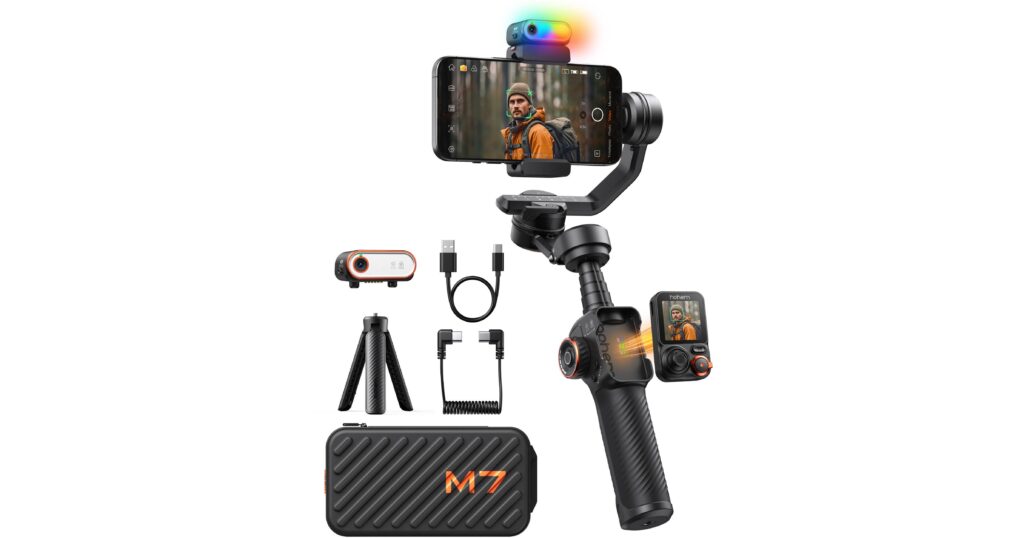
Key Features That Make Hohem Stand Out
1. Advanced 3-Axis Stabilization
Hohem gimbals use intelligent motors that stabilize your phone across three axes. This means your footage stays smooth whether you’re walking, running, or filming dynamic scenes.
For vloggers and travel creators, this feature alone can dramatically improve video quality.
2. AI Tracking Technology
Many Hohem gimbals come with built-in AI tracking modules that automatically follow a subject. Once activated, the gimbal will keep the person centered in the frame.
This is especially useful for:
- Solo creators
- Fitness instructors
- Dance videos
- Live streaming
You no longer need someone behind the camera to track your movement.
3. Gesture Control
Gesture control is another feature creators love. Simply make a hand gesture to start recording, stop recording, or activate tracking.
This makes filming alone much easier and faster.
4. Multiple Creative Modes
Hohem gimbals typically offer several shooting modes, including:
- Follow Mode – ideal for walking shots
- Pan Follow Mode – smooth panning motion
- POV Mode – immersive action shots
- Inception Mode – dramatic rotating camera movements
These creative options help creators experiment with cinematic styles.
How to Use a Hohem Gimbal (Beginner Guide)
If you’re new to gimbals, getting started is simple.
Step 1: Mount Your Smartphone
Attach your phone securely to the clamp and ensure it is centered for proper balance.
Step 2: Power On the Gimbal
Turn on the device and allow the motors to stabilize the phone automatically.
Step 3: Connect to the App
Download the official Hohem mobile app and connect via Bluetooth. This unlocks advanced features like AI tracking and creative shooting modes.
Step 4: Choose Your Shooting Mode
Select a stabilization mode depending on your scene. For example, follow mode works well for walking shots.
Step 5: Start Recording
Begin filming and let the gimbal stabilize your movement.
Save More on Hohem Gimbals (Coupons + Cashback)
If you’re planning to buy a Hohem smart gimbal, you can save even more by using the latest coupon codes below and activating cashback through our partner page.
Activate Cashback & Shop Hohem
- 10% OFF Hohem Sitewide Gimbals
Coupon Code: HOHEM10OFF - $40 OFF Hohem All Products (once per order)
Coupon Code: LM40 - New Customer 8% OFF
Coupon Code: 1ST8%Off - 18% OFF Hohem iSteady V2
Coupon Code: AFTERDARK - $85 OFF Hohem Orders (once per order)
Coupon Code: LM85 - 12% OFF iSteady V3 Ultra
Coupon Code: LM12% - 12% OFF Hohem iSteady M7
Coupon Code: LM12
👉 Click the button above to activate cashback and apply the coupon code during checkout to maximize your savings.